
MOBILE OPTIONS
22Bet: iPhone, Android and mobile access
22Bet app pros and cons
Advantages
- Save the mobile site to your home screen if you do not want a full app.
- Keep the same account when switching between phone and computer.
- Use booking codes to reload selections without rebuilding a bet slip.
Limitations
- An Android APK update can mean downloading a new file.
- Comparing several matches takes more scrolling on a phone.
22Bet lets you choose how much you want to install on your phone. There are Android and iPhone apps in supported markets, a mobile website and a web app that you can add to your home screen. The same account works across these options.
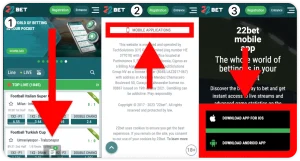
22Bet on iPhone and iPad
Start with the iOS option on the official 22Bet website. If it opens an App Store listing for your country, check the developer and compatibility, tap Get and confirm the download. Sign in with your normal 22Bet account after installation.
If the listing is unavailable, use the official mobile site in Safari where the service is permitted. You do not need an APK: that file format is only for Android.
For an iPad, use the compatibility details in the current App Store listing to check device support. A home-screen web app is a separate option, not proof that there is a dedicated iPad download.
How to add the 22Bet web app to your home screen
A PWA is a website that can open from its own icon. It is useful when you want quick access without downloading a full native app. It still uses an internet connection and can store website data on your device.
On iPhone or iPad, open the official site in Safari and look for Add to Home Screen in the sharing options. On Android, Chrome may offer Install app or Add to Home screen. The wording depends on the browser version.
Do not confuse a saved website icon with an App Store installation. Our app versus mobile browser comparison explains what changes in daily use.
22Bet APK download for Android
Use the Android link on 22Bet’s official website. Follow Google Play when it is offered for your market, or use the official APK download.
- Download the Android file from the official page.
- Open it from your downloads.
- If asked, allow the browser to install this app.
- Finish the installation and remove that permission if you no longer need it.
Leave your phone’s security scanning enabled. Stop if a harmful-file warning appears. Do not use modified APKs or a copy posted on a forum.
22Bet login and switching phones
Use your existing account rather than registering again. If you cannot sign in, check the login details, use password recovery and make sure the app is up to date.
Before reinstalling, confirm that you can access the email address or phone number used for recovery. Reinstalling an app does not recover a forgotten password.
Saving a bet slip with a 22Bet booking code
A booking code stores selections so you can load a slip again instead of adding every match manually. It can be useful when preparing a multiple bet on one device and reviewing it on another.
Loading the code does not mean the bet has been placed. Check the current selections, available prices and stake, then confirm only if you still want the bet. Events or odds may have changed since the code was created.
Sports, live betting and casino
The mobile options cover the sportsbook, live markets, casino sections and account tools. Search and favourites can shorten the route back to an event you follow. On a small screen, open the full market description before selecting an outcome; similar labels can refer to different periods or handicaps.
For live betting, do not rely on a television or streaming picture being perfectly current. Read the price accepted in the bet slip. A market can pause after a goal, injury or other important event.
Payments and bonus terms
Check the cashier in your account for the available methods and withdrawal options. Before accepting a bonus, read the qualifying deposit, wagering conditions, eligible odds and expiry. The headline amount does not explain how much can be withdrawn.
For another bookmaker offering an official Android download and mobile-browser access, see our Melbet app review.
Keeping the 22Bet app updated
For a store-installed app, check its update page in that store. If you installed the APK, follow the official update route rather than downloading from a third-party archive. The web app receives website changes without a separate APK download.
22Bet app FAQ
Can I use 22Bet on iPhone without the App Store app?
Yes, you can use the permitted mobile website and add it to your home screen. That is different from installing a native app.
Does an Android APK work on iPad?
No. Use the official iOS listing if it supports your iPad, or open the website in Safari.
Does a booking code place my bet automatically?
No. It loads selections for you to review. A wager requires a separate confirmation.
Do I need another account for the PWA?
No. Use the same login as the official 22Bet website.
SOURCES CHECKED
Official operator, app-store and regulator pages used for this review.